
For years, Ask Preppr, our original document chat, was pretty simple. You asked a question, it gave you an answer. If you uploaded a document, it could talk about that document. That was useful, but it wasn't enough.
Today, Ask Preppr is something different — an agentic assistant built for the actual shape of preparedness work. It plans. It reasons across your Preppr Knowledge base and the open web. It runs specialized helpers in parallel. It produces cited, exportable deliverables. It asks you structured questions when it needs to, and it hands off cleanly to the rest of Preppr when a chat outgrows a chat.
Here's what that means for the people who use it every day.
One place to start, and it knows where to send you
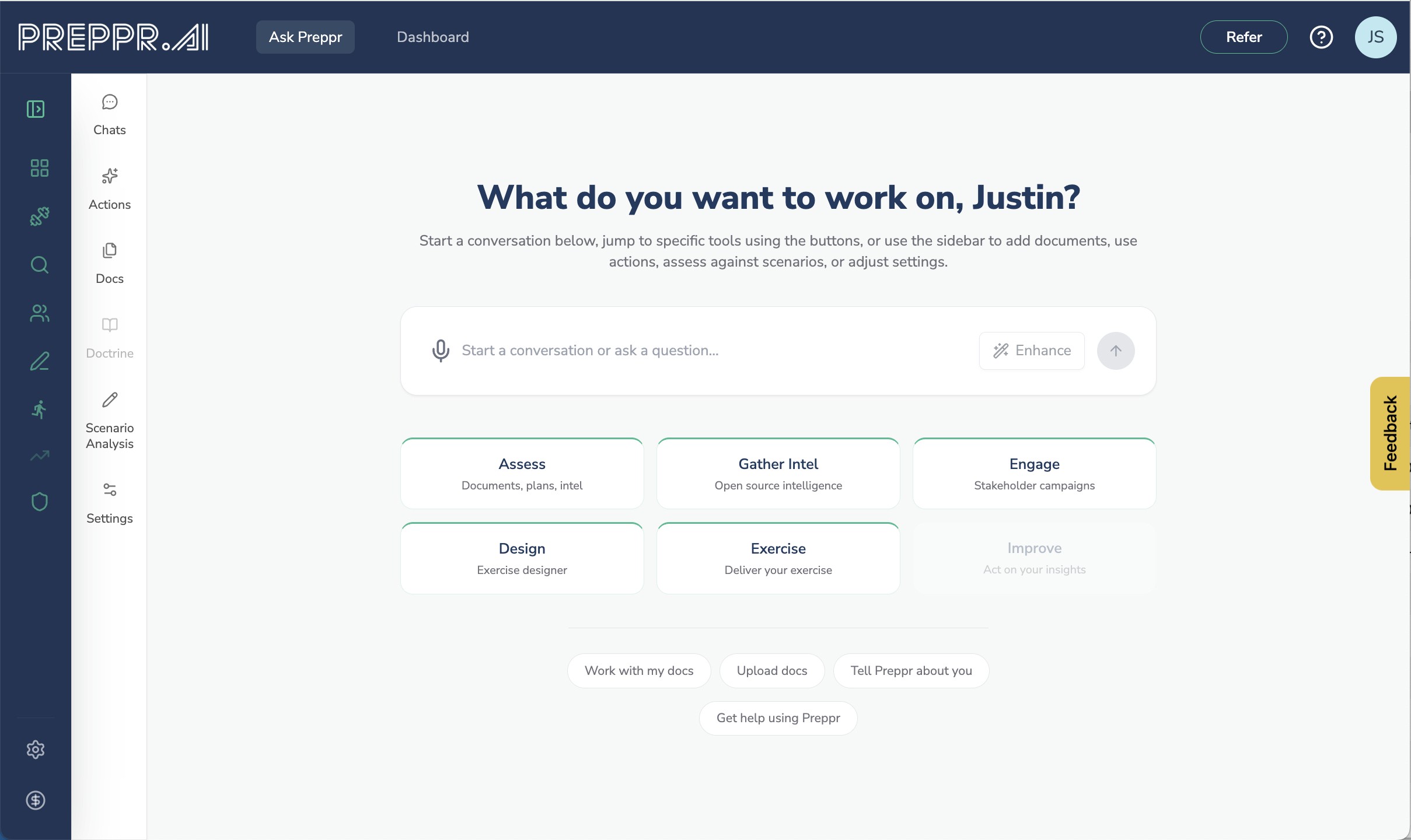
When you log in, you land in a focused workspace with Ask Preppr welcome lander. You type what you need — a question, a task, a scenario — and Preppr figures out what kind of work that is.
A compliance audit is different work than a CPG 101 analysis, which is different from a quick lookup, which is different from a full scenario walkthrough. Ask Preppr routes you into the right kind of response without making you pick a mode up front. When it's genuinely unsure what you want, it asks — with a clean choice card, not a guessing game. When you aren't sure, Preppr will guide you to the right feature and tool.
It draws on your entire Preppr Knowledge base
This is the biggest shift. Ask Preppr now reasons across your whole Preppr Knowledge base — the connected model of your organization's doctrine, plans, AARs, profile, and the full national doctrine corpus (CPG 101, HSEEP, NIMS, NRF, Core Capabilities, PHEP, HPP, and the rest) that ships pre-loaded with every account. Not just the file you happen to have open. Not just a pile of text chunks. The whole posture.
The interface keeps sources visually distinct so you always know what came from documents you selected and what Ask Preppr surfaced on its own. Every source is clickable. Every citation opens the document viewer at the exact section that supported the answer. No more "trust me, it's in there somewhere."
And when you attach a document to a single session for a quick look, that attachment stays in the session. It doesn't pollute your knowledge base. Your permanent library only holds what you've deliberately added — everything else is transient by design.
Three response modes, picked for you
Some questions need a fast answer. Some need careful analysis. Some need the most rigorous reasoning available. Ask Preppr offers three tiers — Fast, Standard, and Deep Analysis — and by default picks the right one for each turn based on what you're actually doing. A CPG 101 review, an after-action analysis, a compliance audit, or an intelligence brief automatically gets Deep. A quick factual question gets Fast. You can override this any time.
The goal is simple: the depth of reasoning should match the depth of the question, without you having to think about it.
Preppr Actions — guided workflows for real preparedness tasks
We've added a dedicated menu of guided Actions built around the work practitioners actually do: CPG 101 planning, after-action review, compliance audits, scenario analysis, job-aid building, assumption extraction, ESF reconciliation, and more. Two new Actions — Alert/Warning Template generation and Rapid Exercise Generation — are rolling out in beta.
Each Action is a real workflow, not a prompt template. When you pick one, Preppr can spin up multiple specialized helpers working in parallel — one searching your knowledge base, one pulling current events, one synthesizing — and show you exactly what's happening while it works.
Scenario Based Gap Analysis
Plan gap analyses tend to fail in a predictable way: you end up reviewing the plan against itself. You check that the sections are filled in and the annexes cross-referenced. What you don't do is walk the plan through a specific threat and see where it breaks.
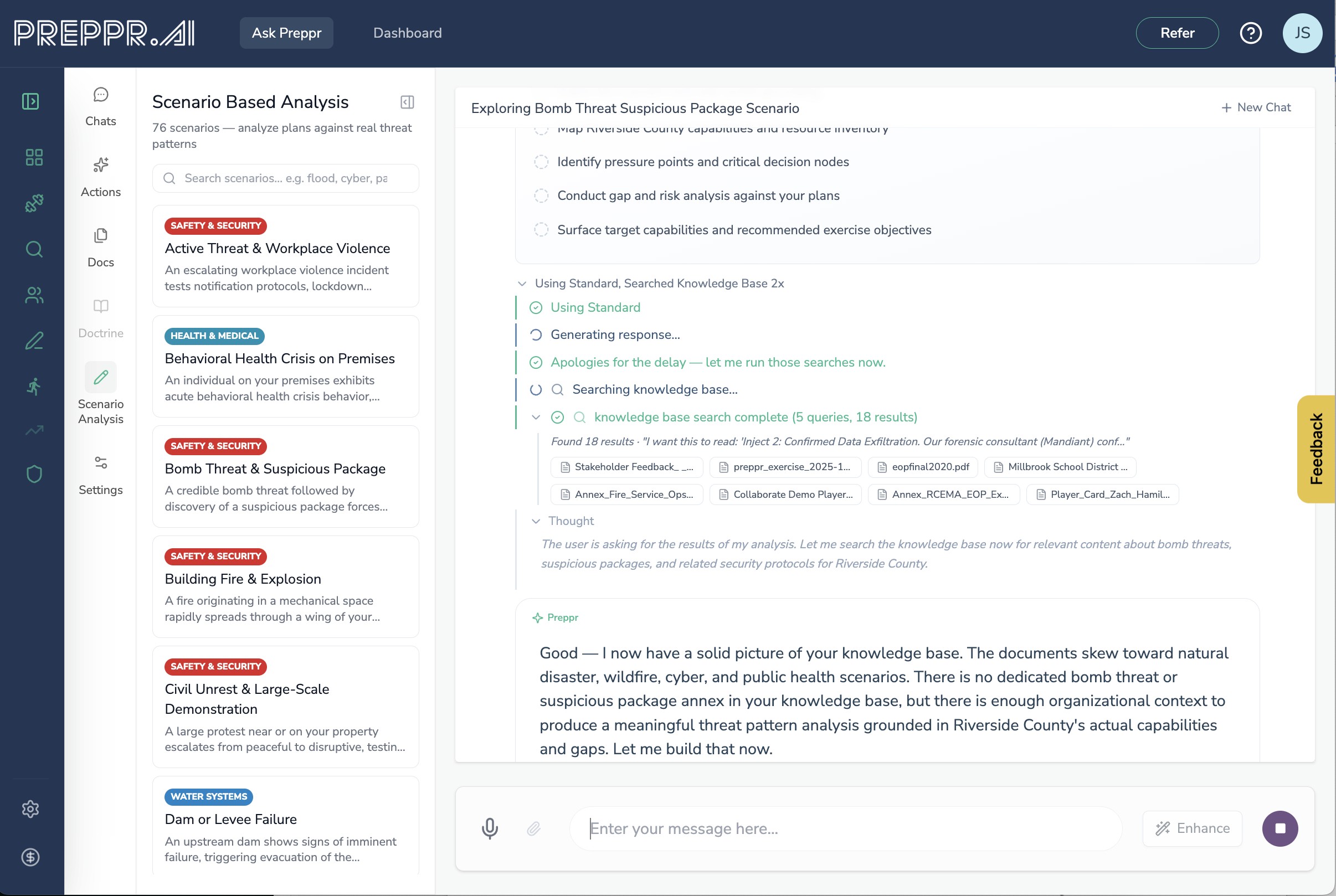
Scenario Analysis fixes that. Pick from 70+ threat scenarios — grounded in real incidents and the failure patterns that actually recur in this field — and Preppr walks your plan through the scenario phase by phase, surfacing the assumptions that wouldn't hold, the capabilities you don't have, and the decisions you'd be making live.
This isn't an exercise. Exercises have objectives, evaluators, and AARs — and you build those in Preppr Exercise Designer V2. Scenario Analysis is a planning tool. It helps you articulate gaps before you commit to exercising anything, so when you do run an exercise, it targets something you've already identified as real.
The output is structured the way emergency managers think: phase, capability, function. Concrete gaps, tied to concrete parts of your plan, in language you can drop into an improvement plan or a briefing.
Work with my documents
A dedicated entry point for when you want to focus on specific files. Pick your documents, confirm, and Preppr offers you four paths: Summarize, Assess, Compare, or open-ended Ask. It's the fastest way to get into a productive document-grounded session.
Live web search
A toggle turns on live web search, letting Preppr pull current information from the open web and cite it alongside your internal sources. Useful for threat briefings, emerging guidance, regulatory updates, or anything where your library won't be current enough.
Intelligence mode
A new mode built for threat briefings. It pulls real-time current events, forces the deepest reasoning tier, and produces briefings anchored in current intelligence. When you need to know what's happening right now and what it means for your jurisdiction, this is the entry point.
You can watch Preppr think
Every response shows its plan in real time: analyzing the request, searching the knowledge base, drafting. You see which tools are running, what searches were executed, and when each phase completes. Every tool call is a collapsible block you can expand if you want the detail or ignore if you don't.
This isn't theater — it's accountability. You can see exactly where an answer came from, which means you can trust it or challenge it on specifics.
Deliverables land in a canvas, not buried in chat
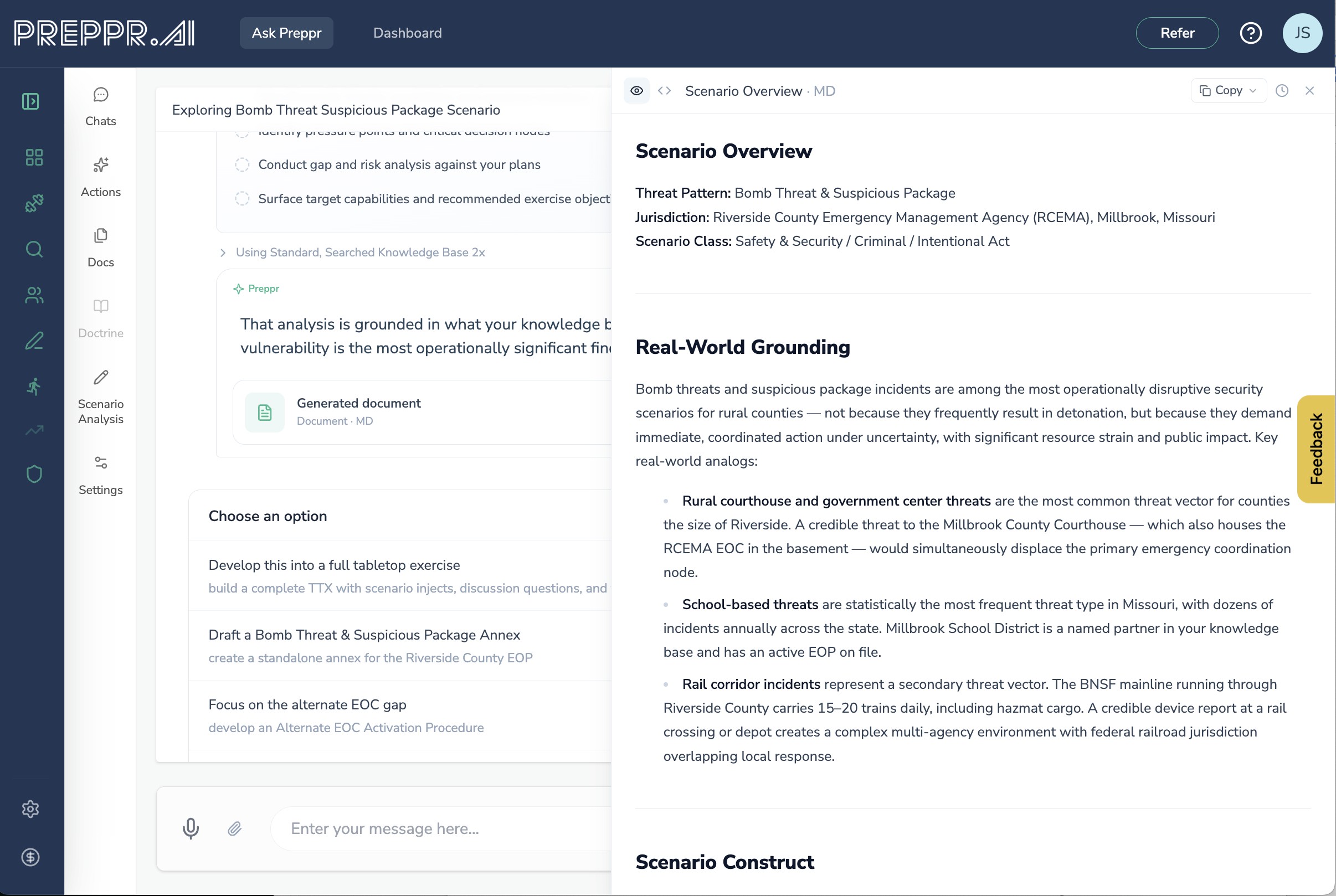
When Ask Preppr produces something substantive — a report, an audit, a plan, a briefing — it renders in a dedicated canvas pane alongside the conversation. The canvas has its own title, its own export and copy actions, and stays clean (no stray pills, no "click here to continue" cruft). You keep chatting on the left while the deliverable lives on the right.
Structured questions, when they help
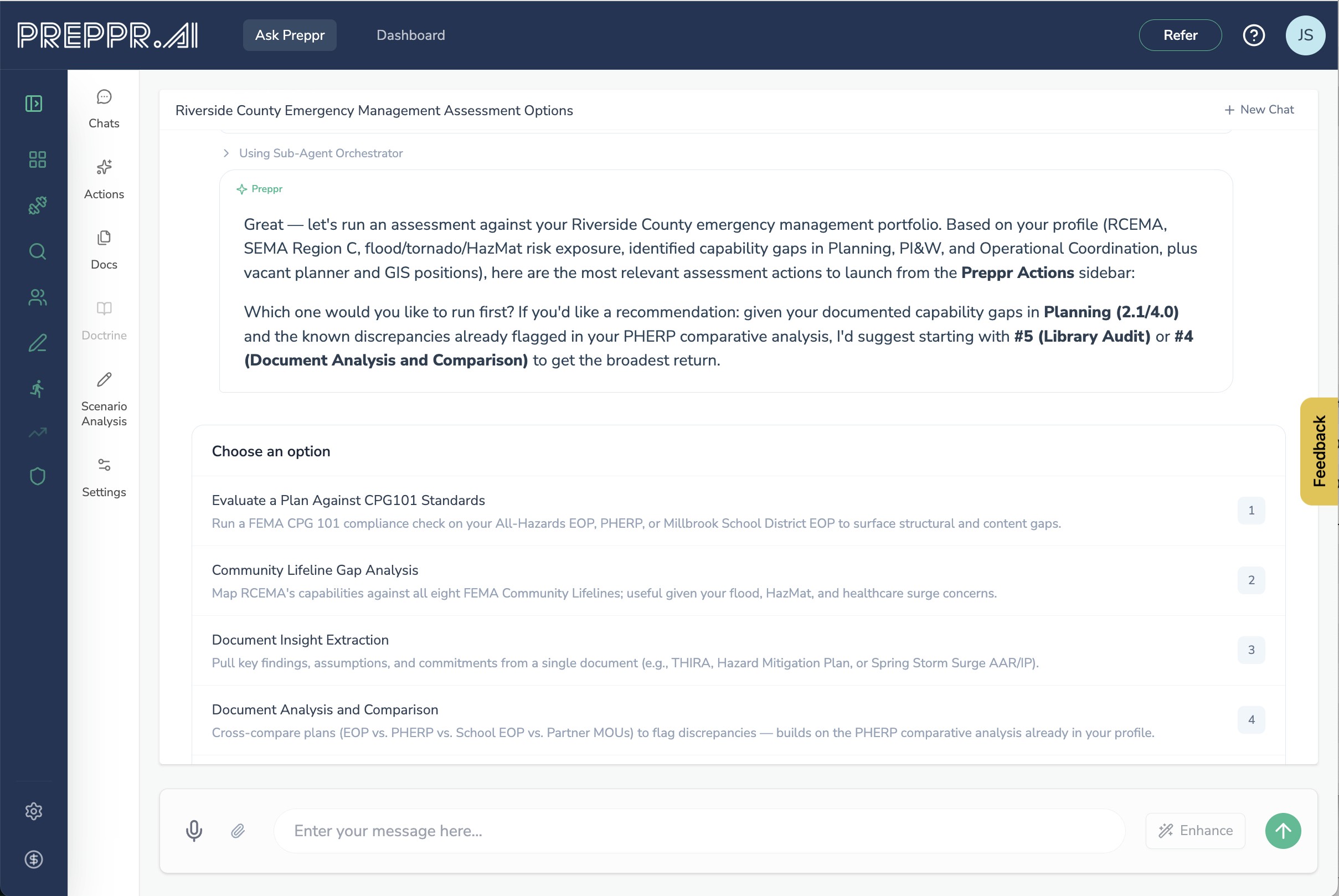
Sometimes Preppr needs information from you before it can continue. Instead of a wall of prose asking you five things at once, it now offers structured choice cards — single-select for picking one option, multi-select with checkboxes when you need several, and multi-step wizards for longer intakes. Everything is keyboard-navigable. Your answers batch into a single response, so you're not stuck in a back-and-forth ping-pong for every sub-question.
Context-aware follow-ups
After every response, Ask Preppr suggests what to do next — tuned to what you just did. After an assessment, it suggests seven relevant follow-on actions. After a scenario analysis, the suggestions are scenario-specific. The goal is to keep momentum going when you're in a working session, not to make you figure out the next step from scratch.
Hand off into the rest of Preppr
A chat often surfaces a need that belongs somewhere else — an exercise that should be designed properly, a collaboration that should move into Collaborate, an exercise that should actually be run. Ask Preppr can now hand off directly into those tools with context carried over. Your chat doesn't die at the edge of the chat window.
What's not changing
Your existing documents and chats are untouched. We've already processed your library into Preppr Knowledge. Your subscription tier and pricing are unchanged. Your existing Actions still work. If you had a specific workflow you relied on, it's still there — just faster, better-grounded, and more capable.
The shift underneath
The old Ask Preppr was a typewriter attached to a language model. The new Ask Preppr is a practitioner's workbench — one that reasons across your entire preparedness posture, plans its own work, shows you what it's doing, cites its sources, and delivers artifacts you can actually use.
That's possible because of what sits underneath it. We launched Preppr Knowledge today alongside this release — the structured, connected model of your organization's doctrine, plans, profile, and (soon) sessions, collaborators, and more. Ask Preppr is the front door to that knowledge. Exercise Designer V2 is another. Every new tool we build will be another.
This is the direction Preppr has been heading since day one: treating preparedness as a living, connected body of knowledge rather than a pile of documents, and treating AI as a way to make that knowledge work harder for you — not as a faster way to produce more paper.
Starting today, the front door is finally built like one.
The rebuilt Ask Preppr is available now to all Basic and Pro accounts at no additional cost. If you're already a subscriber, it's live in your workspace today.
Not a subscriber yet? Grab a 14-day, all access, free trial.