
Great exercises don't get built by one person. They get built by a team — a planner drafting, a subject-matter expert weighing in, an exec sponsor reviewing, a regulator checking the boxes. Somewhere in there a scenario has to be chosen, objectives have to be nailed down, modules and injects have to line up, and the whole thing has to end up as a document that leadership can read and evaluators can use.
The old Exercise Designer handled the document part. You picked a scenario, filled in fields, exported a file. That worked for a single person building a single exercise in one sitting. It didn't work for how exercises actually come together in practice.
Today we're launching Exercise Designer V2 — a ground-up rebuild of how exercises get designed in Preppr. It's a collaborative, AI-assisted workspace where a team can design, review, and hand off a full HSEEP-aligned exercise together. Here's what's different, and why it changes the kind of exercises you can build.
What AI "exercise design" usually means — and why it falls short
There's a wave of tools in the emergency management space right now calling themselves AI exercise designers (one even paying money to keep Preppr out of a conference, ha!). Most of them are ChatGPT wrappers, or document chatbots with an "exercise" prompt, or generic LLMs dressed up in EM branding. Ask any of them for an exercise and you'll get content back — a scenario paragraph, some bullet-point objectives, a handful of injects laid out in a table. Drop it into a Word template and it looks like an exercise.
It isn't one.
Exercise design is not a content problem. It's a coordination problem. A real exercise is an orchestration — scenario grounded in a specific threat and jurisdiction, objectives tied to capabilities you can actually test, modules sequenced so they build on each other, injects timed to force the decisions you want to surface, functional groups assigned so the right people are making the right calls, and the whole thing documented so reviewers can sign off and evaluators can use it. Change any one of those pieces and the others have to respond.
A chatbot generates text. It doesn't know your doctrine, doesn't know your jurisdiction, doesn't track what depends on what, can't take reviewer feedback holistically and plan revisions, can't hand the participant list off to the tool that runs the exercise. It produces something that looks like an exercise on the page and falls apart the moment a practitioner tries to run it.
Exercise Designer V2 is built on the opposite premise: that design is the hard part, content is the output, and the difference shows up in every feature that follows.
An AI / Human workspace, not a form
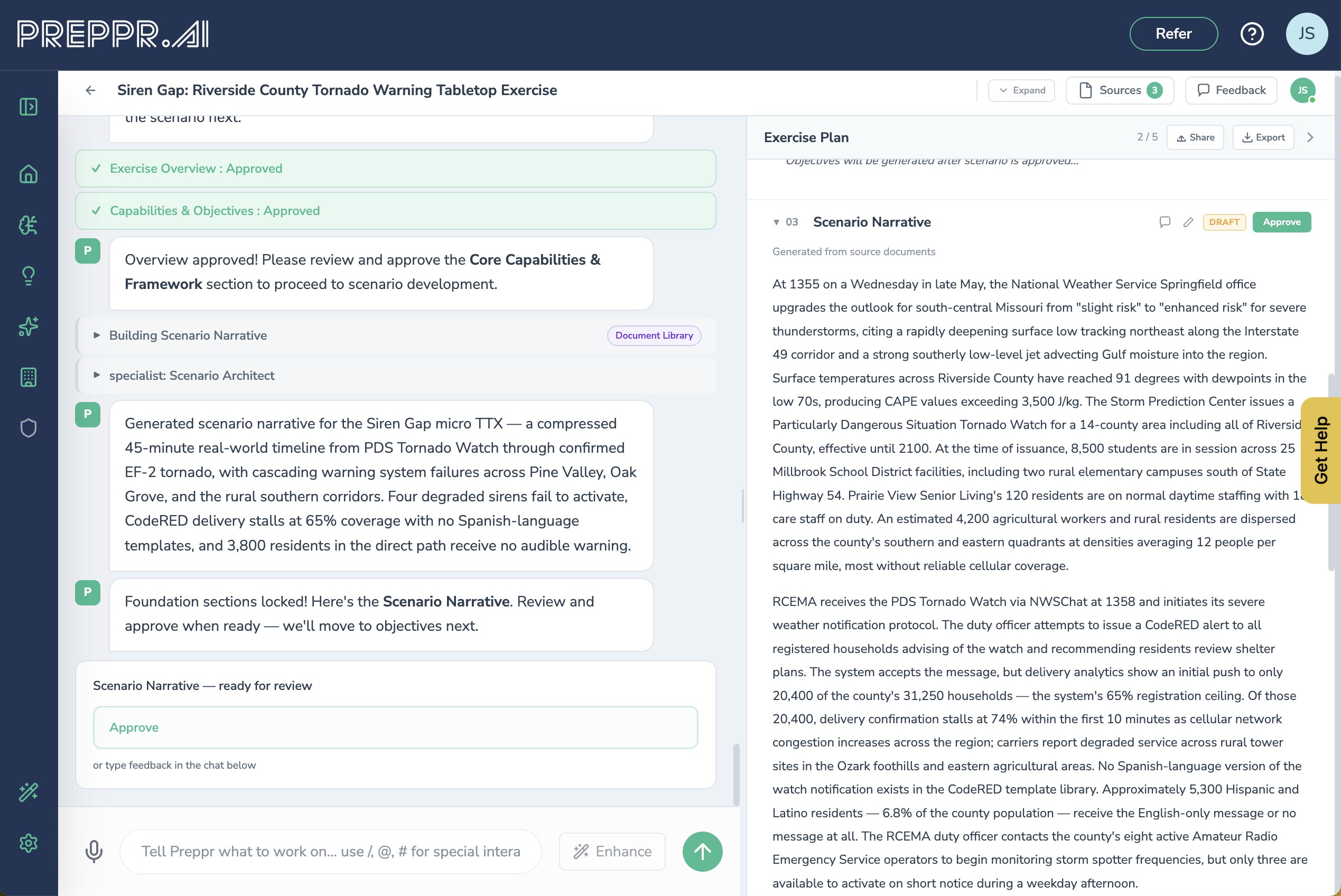
In Exercise Designer V2, an agentic reasoning loop is driving the design. Preppr isn't running a template — it's making decisions. Before each section, it reads what's already been approved, checks what the section depends on, consults your Preppr Knowledge base and any grounding documents you've added, and decides what to draft and how to draft it. When you edit a section, the agent reasons about the downstream implications. When you regenerate, it considers what changed upstream and what still needs to hold. Every move it makes is visible in the chat panel as a task plan, an approval card, or a source consultation — so you're not watching a black box produce content, you're watching an analyst work.
The canvas is a real editor, not a preview. Section statuses — locked, pending, draft, approved, building — show you at a glance where things stand. You can see what's ready for your review, what Preppr is still drafting, and what's been approved and locked in.
You can click into any section and edit directly. You can regenerate a section, refine it with a targeted edit, merge your input with Preppr's suggestions, or undo the last step. The reasoning adapts to whichever move you make.
A team, with real roles
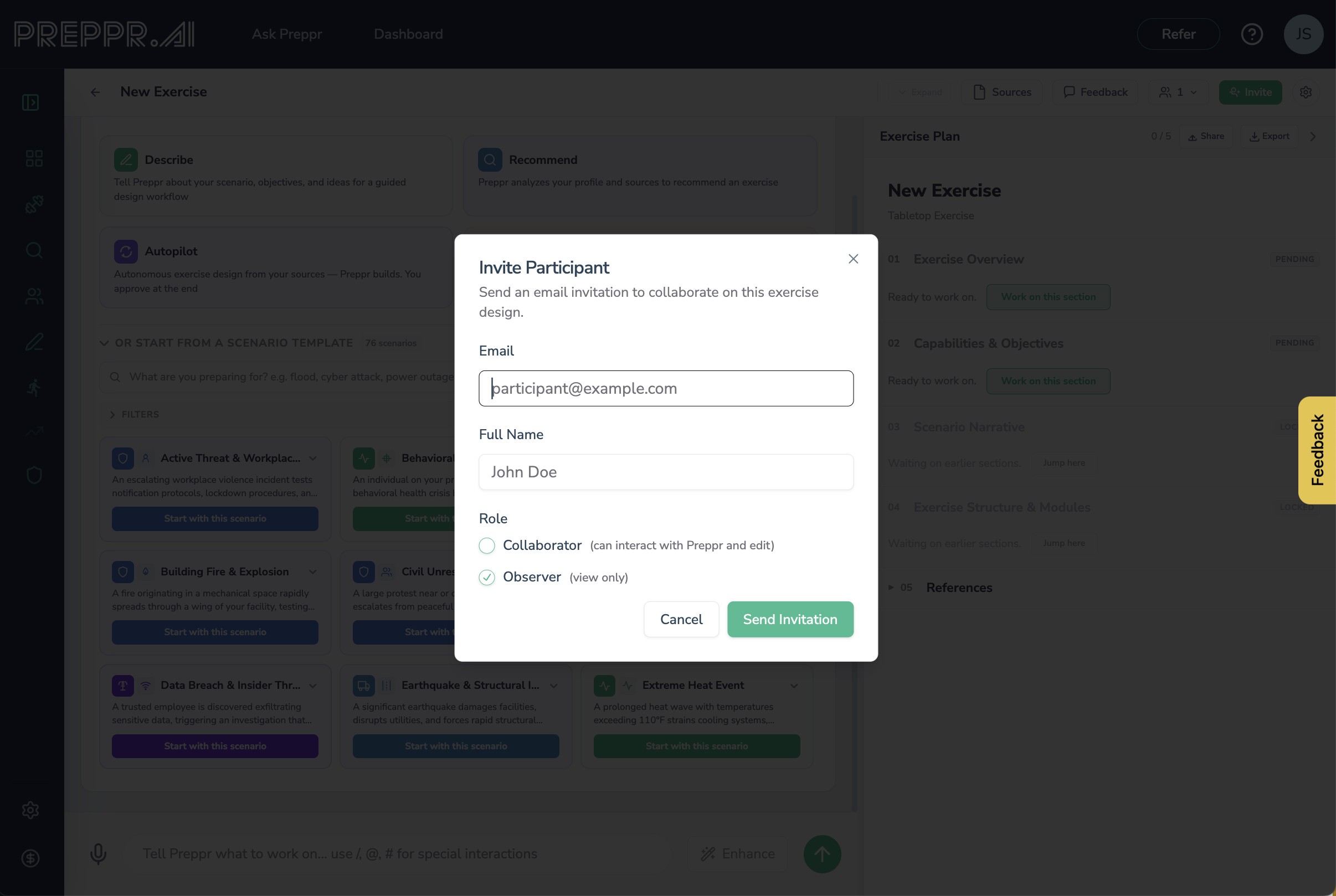
Every exercise in V2 has a participant list with four distinct roles, because not everyone who touches an exercise should be able to touch it the same way:
Owners have full control and can invite or remove participants. Collaborators can edit content but don't manage the participant list. Observers can see the live workspace but can't change anything. Reviewers — SMEs, exec sponsors, regulators — get async feedback rights on a dedicated shared version, without any edit access to the working draft.
That last role is the one that matters most in practice. Every planner knows the pain of sharing a draft with a reviewer who has more authority than exercise-design experience. V2 lets you hand them a read-only link where they can leave section-level comments and inline suggestions. Their feedback flows back into the main workspace aggregated across sections, and Preppr can synthesize what all your reviewers said into a single summary. Email notifications go out when they're invited and when new feedback lands.
Live presence is built in. When another collaborator is in the workspace with you, you see them. When a reviewer submits new comments, you know.
Four ways to start
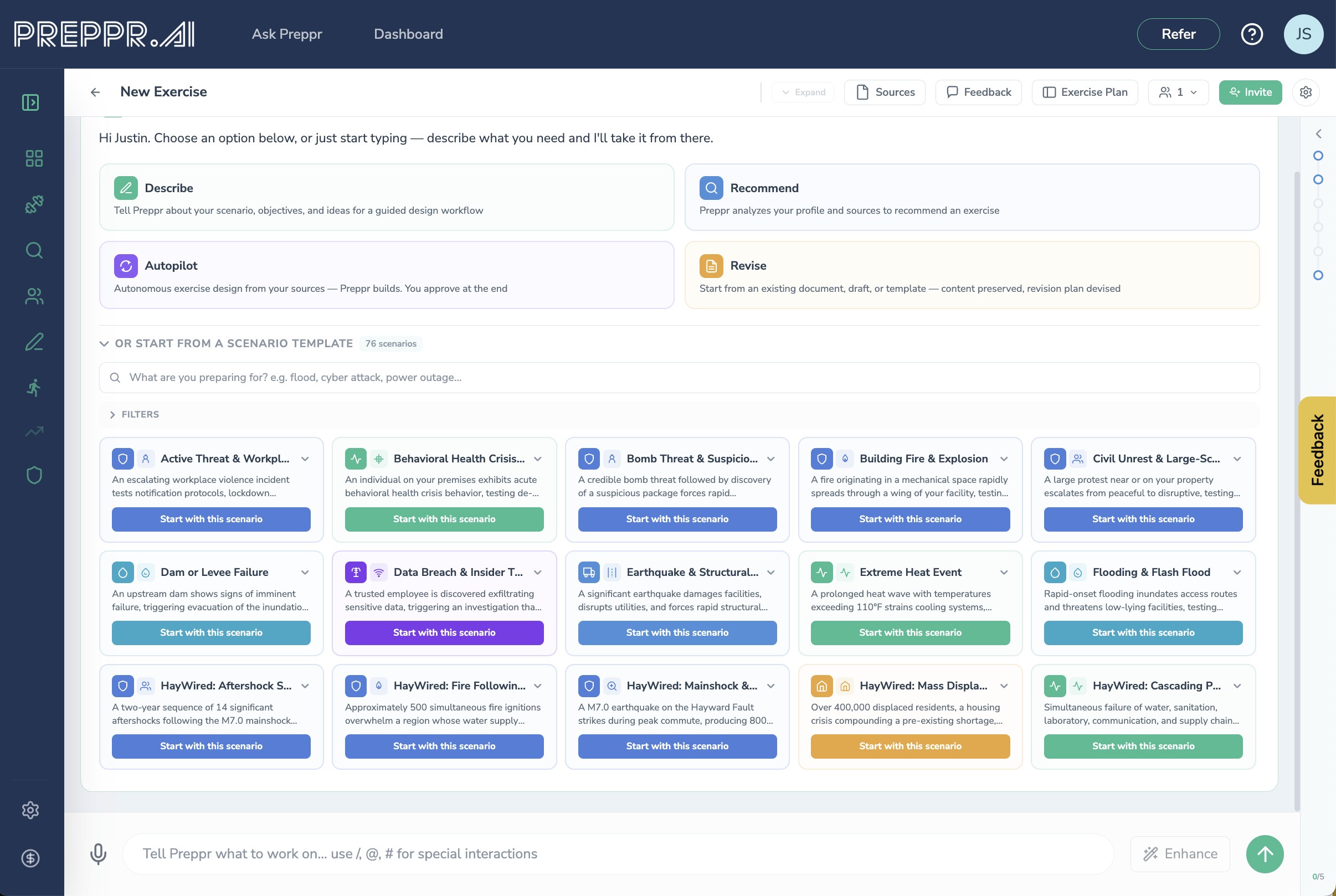
The old Exercise Designer had one starting path. V2 has four, because a planner building from a documented threat works differently than an analyst who wants Preppr to recommend a scenario, which works differently again from someone revising an existing exercise plan.
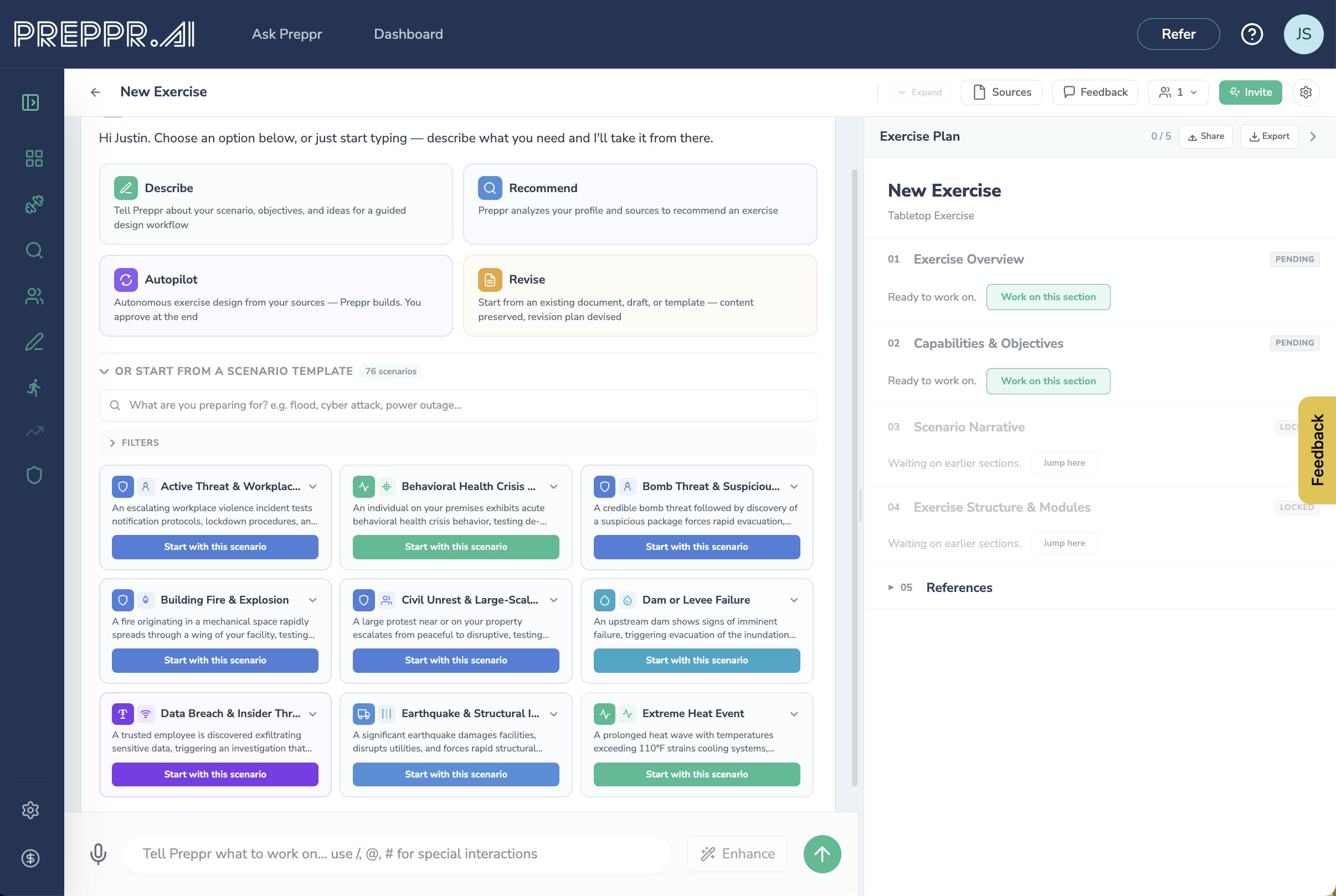
Describe Exercise is the guided path. Tell Preppr the hazard, the jurisdiction, who's at the table, what capabilities you want to test. Preppr asks follow-ups to fill in the gaps, then builds section by section with your approval on each draft. This is the mode for when you know roughly what you want but need help shaping it.
Let Preppr Recommend is analyst mode. Preppr reads your uploaded sources, your profile, and any intel you've gathered, and recommends a tailored exercise concept — the hazard, the objectives, the capabilities, the target audience. You approve the concept, then it builds. This is the mode for when you know what your organization is working on but haven't yet decided what to exercise.
Autopilot is the autonomous mode. Preppr picks the sources, infers the parameters, presents you a Discovery Summary — "here's what I'm about to build, confirm or adjust" — and on your confirm runs the entire pipeline end-to-end: scenario, capabilities and objectives, modules, module details, injects. It runs server-side, so you can close the tab and come back. You can pause, resume, or stop at any moment. When it finishes, a dashboard notification lets you know it's ready for your review.
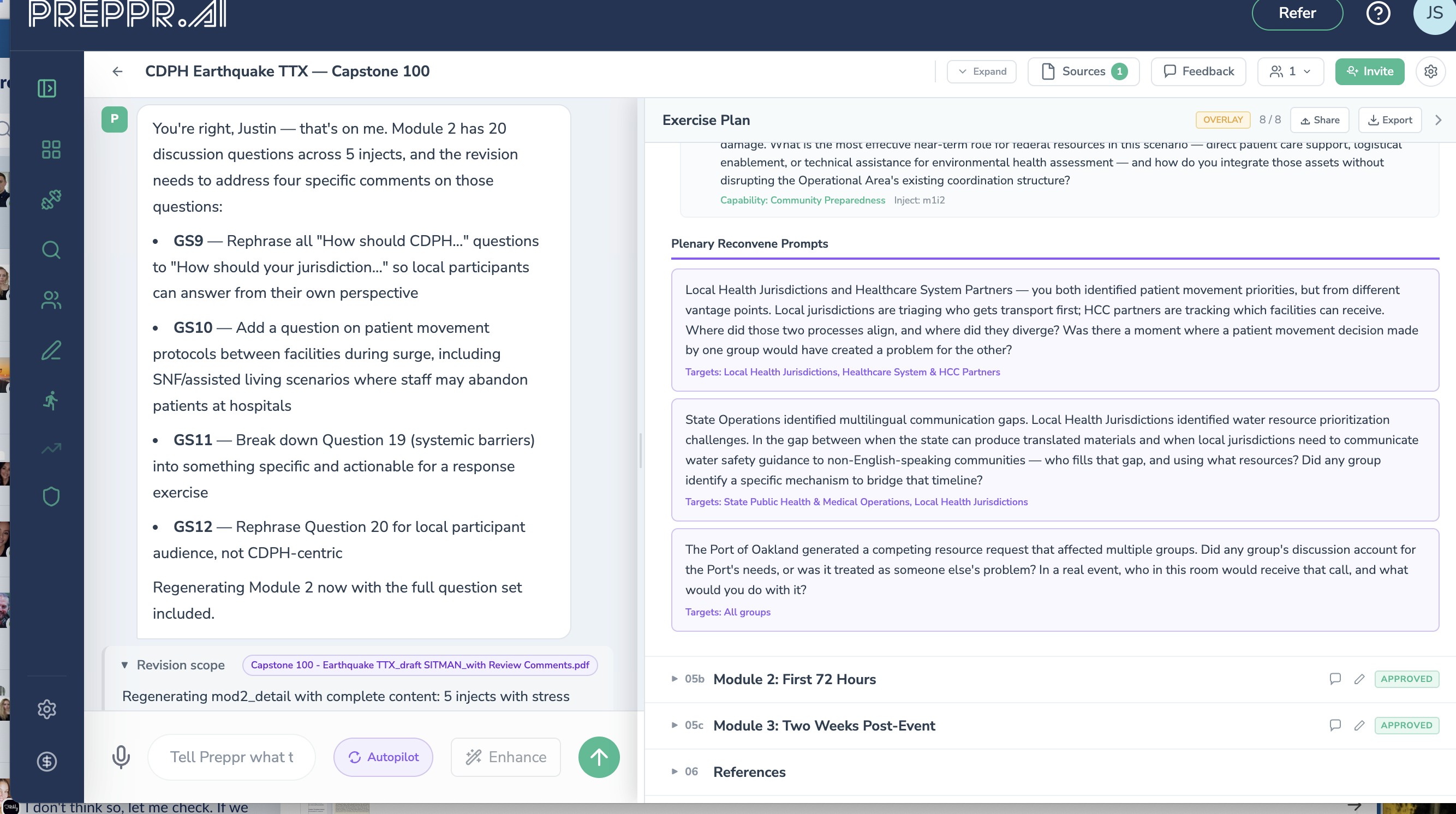
Revise Existing is for the exercise you've already built. Upload an existing Exercise Plan, AAR, or design document — or upload a Situation Manual that's come back from review with hundreds of inline edits and reviewer comments attached. Preppr parses it into the V2 five-section model, auto-approves the sections that are already complete, and reads everything the reviewers marked up. Then it does something a document editor can't: it reviews the feedback holistically, drafts a plan for how to incorporate it — which comments to accept, which to consolidate, which conflict with each other, which sections need to be rewritten vs. nudged — and presents that plan to you for approval. On your go-ahead, it executes. Only the affected sections get regenerated; everything else is preserved word-for-word.
This is the mode that turns a six-week revision cycle into an afternoon. If you've ever stared at a SitMan with three hundred tracked changes from four reviewers and tried to figure out where to start, this is for you.
Grounded in your knowledge, not invented from scratch
Exercise Designer V2 is built on top of Preppr Knowledge, the connected model of your organization's doctrine, plans, profile, and the full national doctrine corpus (CPG 101, HSEEP, NIMS, NRF, PHEP, HPP, and the rest) that ships with every account. Every exercise you build draws on all of it.
You can also drag and drop documents directly into the designer — an AAR you want the scenario grounded in, a plan you want the objectives aligned to, an SOP you want the injects to reflect. Those documents get parsed and made available to the generator while it's drafting, so the scenario, objectives, and injects can be grounded in your own material, not generic templates.
And when you need real-world intelligence, you can ask Preppr to gather intel on a topic directly from the chat panel — recent floods in California, ransomware incidents at municipal utilities, lessons learned from a specific past event. Preppr queries live news sources through AskNews, synthesizes what it finds into structured findings with source URLs and publication dates, and delivers them into your exercise as grounding material. Those findings then flow through as sources when Preppr writes the scenario and injects. When AskNews is briefly unavailable, Preppr falls back to live web search and keeps going.
70+ scenario starters
Picking a scenario from a blank page is hard, and most exercises default to whichever hazard got attention last. V2 ships with over seventy pre-built scenario starters — real threats, grounded in real incidents, tagged by region, doctrine, and affected lifelines.
The library covers ransomware, phishing, insider threats, and IEDs on the cyber and CTEP side; wildfires, earthquakes, floods, hurricanes, tornadoes, and winter storms across natural hazards; pandemic, infectious disease, and hazmat scenarios for public health; and infrastructure failures from power-grid to water-system contamination. Doctrine frameworks are represented — HSEEP, FEMA, PHEP, EPH, HPP, and the ESFs. Regional sets cover the US, Europe, Asia-Pacific, Middle East and Africa, the Americas, and global events.
Every starter auto-maps to the eight FEMA Community Lifelines, so you can see at a glance what infrastructure and population supports a scenario will exercise. Full-text search with synonym matching runs across the whole library, so "mass casualty" and "MCI" both find what you'd expect.
Sized for the exercise you're actually running
Pick a duration tier up front — Micro, Short, Standard, Extended, or Multi-day — and the designer sizes everything else to fit. Module count, inject count, discussion questions per module, and maximum functional groups all adjust automatically. A micro tabletop doesn't get twelve modules. A multi-day functional exercise doesn't get shortchanged on injects.
Pick Tabletop or Tabletop with Functional Groups. The second option structures modules and injects around parallel groups — Operations, Logistics, PIO, and however many you need — so a larger audience can exercise simultaneously without collapsing into one conversation.
Watch Preppr work, and push back when you want to
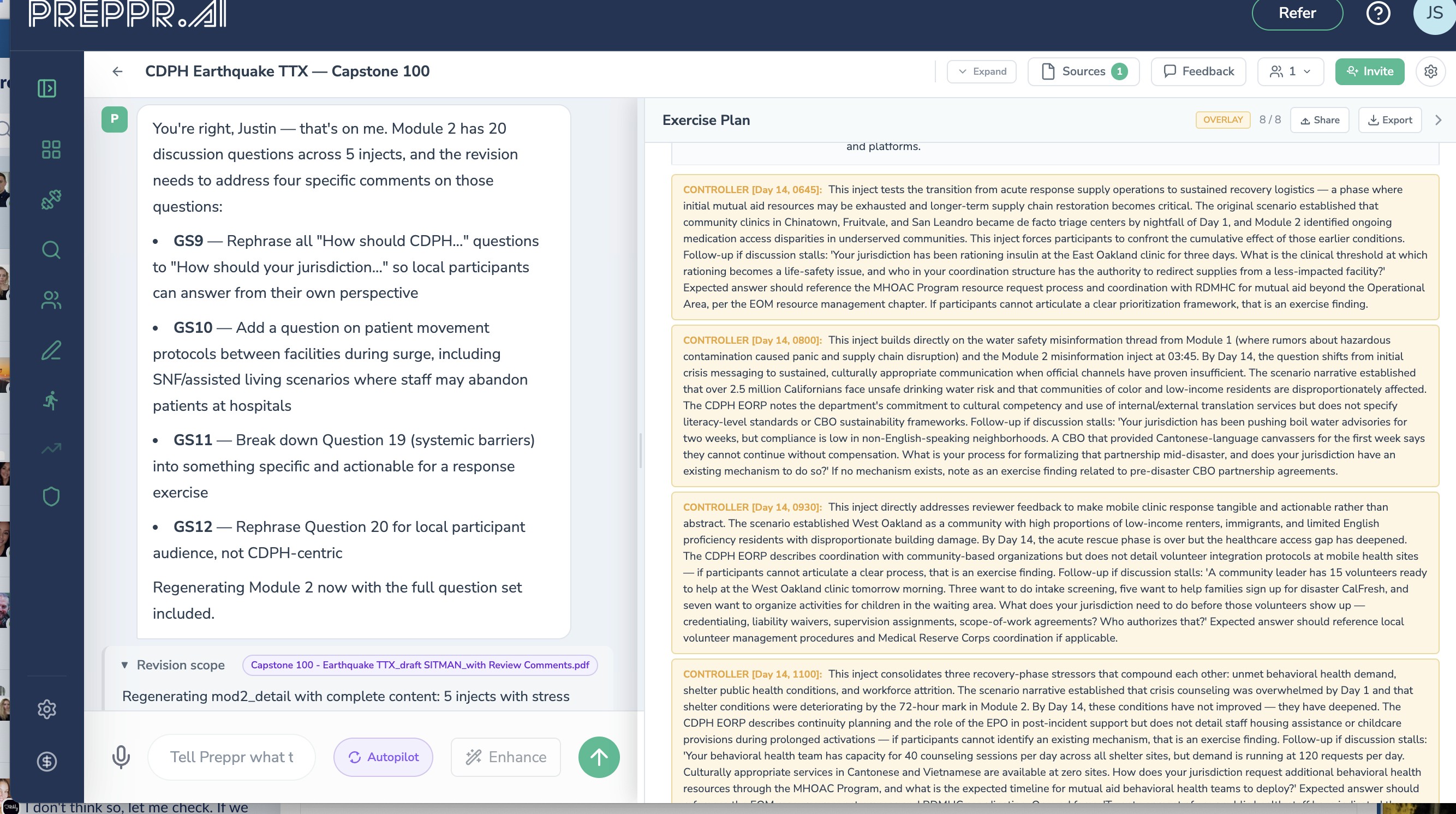
The chat panel mirrors the interaction primitives you already know from Ask Preppr. Approval cards show you what Preppr is about to generate and let you accept or edit. Choice cards ask targeted questions when Preppr needs input. Task-plan updates tell you what it's about to do and what it just finished. Source consultation cards show you the exact document chunk, knowledge snippet, or news article used to ground a section.
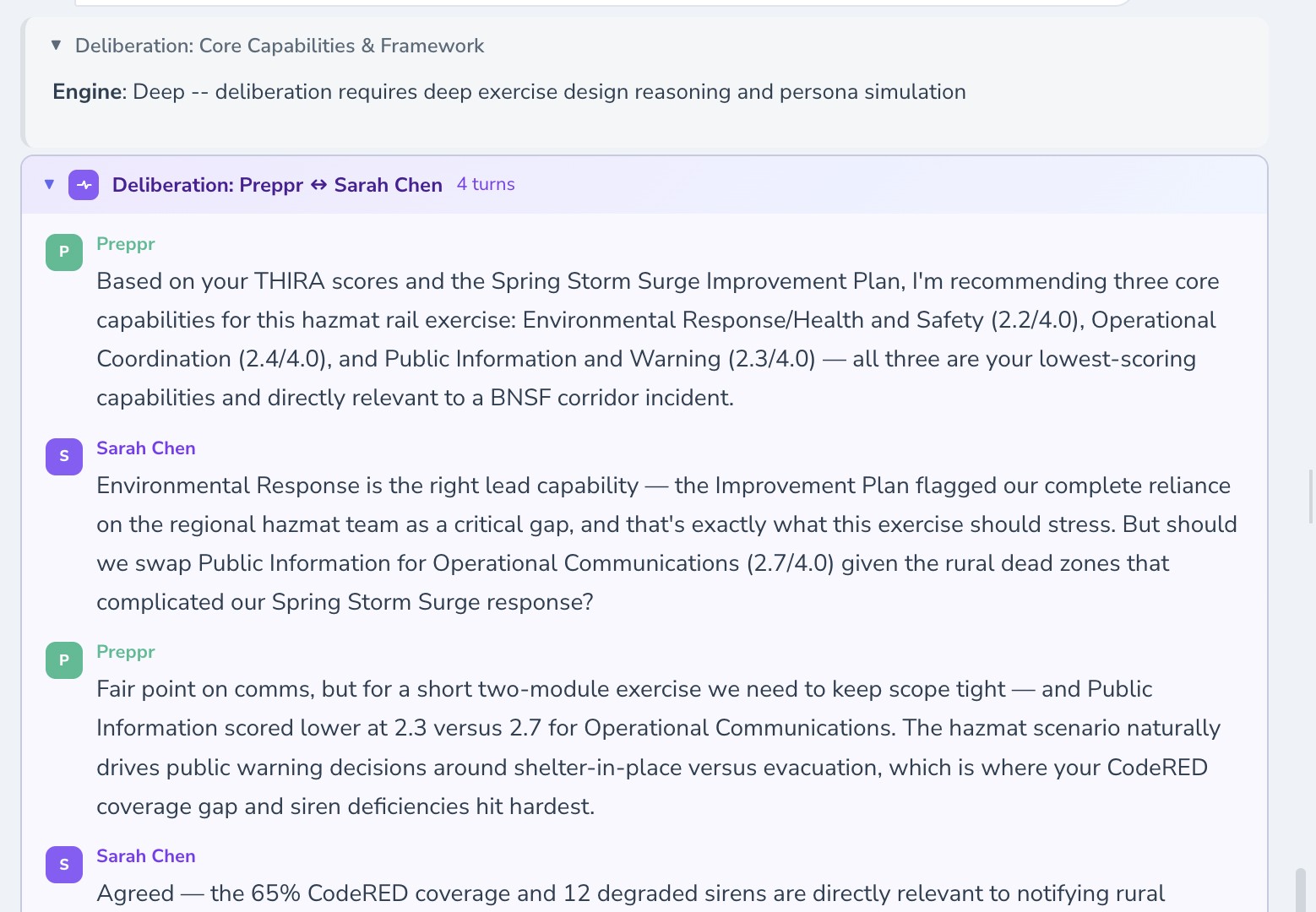
When a section benefits from multiple perspectives, you'll see deliberation blocks — visible exchanges between Preppr and your configured persona (or a specialist like a scenario ideator, capability designer, or MSEL builder). Expertise surfaced as dialogue, not hidden chain-of-thought you can't inspect or challenge.
And when a long job is running — a full Autopilot build, a large document being processed, an intel pull — you can close the tab and come back.
Export that looks like leadership expects
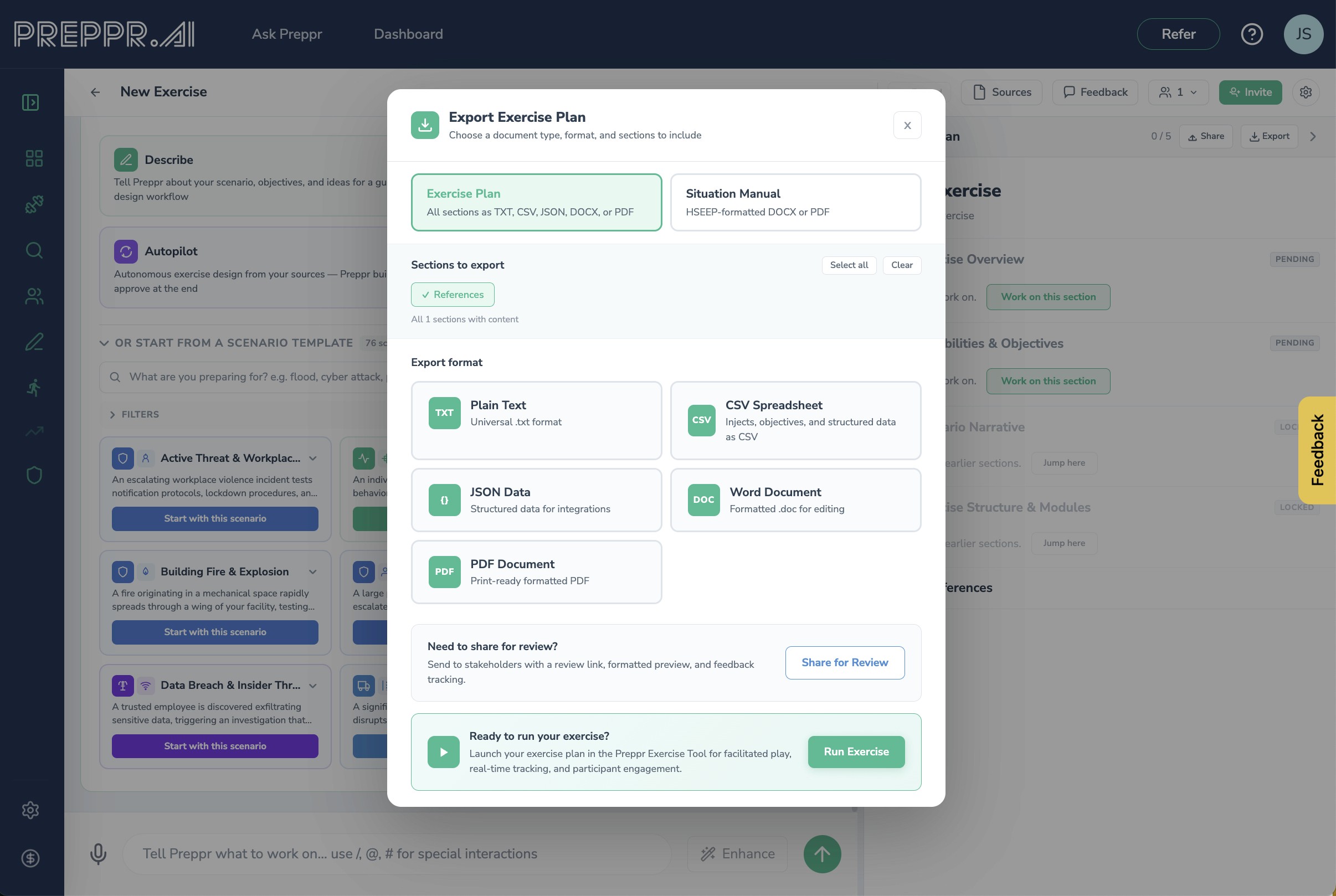
One click produces an HSEEP-style Situation Manual as a polished .docx — cover page, table of contents, headers and footers, proper section structure, table formatting, and your organization's logo. Ready to hand to leadership without reformatting.
A separate Exercise Plan export produces a condensed outline document suitable for circulating before the exercise itself.
Hand-off to the rest of Preppr
An exercise design isn't the end of the work. V2 hands off cleanly to the rest of the platform. Your participant lists — roles, functional groups, emails — feed directly into Run Exercise. No re-entering people, no re-mapping roles. Campaign findings from Collaborate can feed into a new exercise as grounding context, with source attribution carried through. Ask Preppr can hand off into V2 with a scenario already seeded.
The shift
The old Exercise Designer was an AI wizard that produced a document. The new one is a workspace where a team builds an exercise together, grounded in their own knowledge, with a choice of how much autonomy to hand to Preppr and full visibility into what it's doing at every step.
This is the same shift you're seeing across Preppr — treating preparedness as a connected body of knowledge rather than a pile of documents, and treating AI as a way to make that knowledge produce better work, not as a faster way to fill out templates.
Ask Preppr is one front door to that knowledge. Exercise Designer V2 is another. The work each of them produces draws on the same Preppr Knowledge base, cites the same sources, and connects into the same flow.
Available now
Exercise Designer V2 is available today to all Basic and Pro accounts at no additional cost. If you're already a subscriber, it's live in your workspace. Existing exercises built in V1 are untouched; V2 is the new default for anything you build going forward.
Not a subscriber yet? Grab a 14-day, all access, free trial.